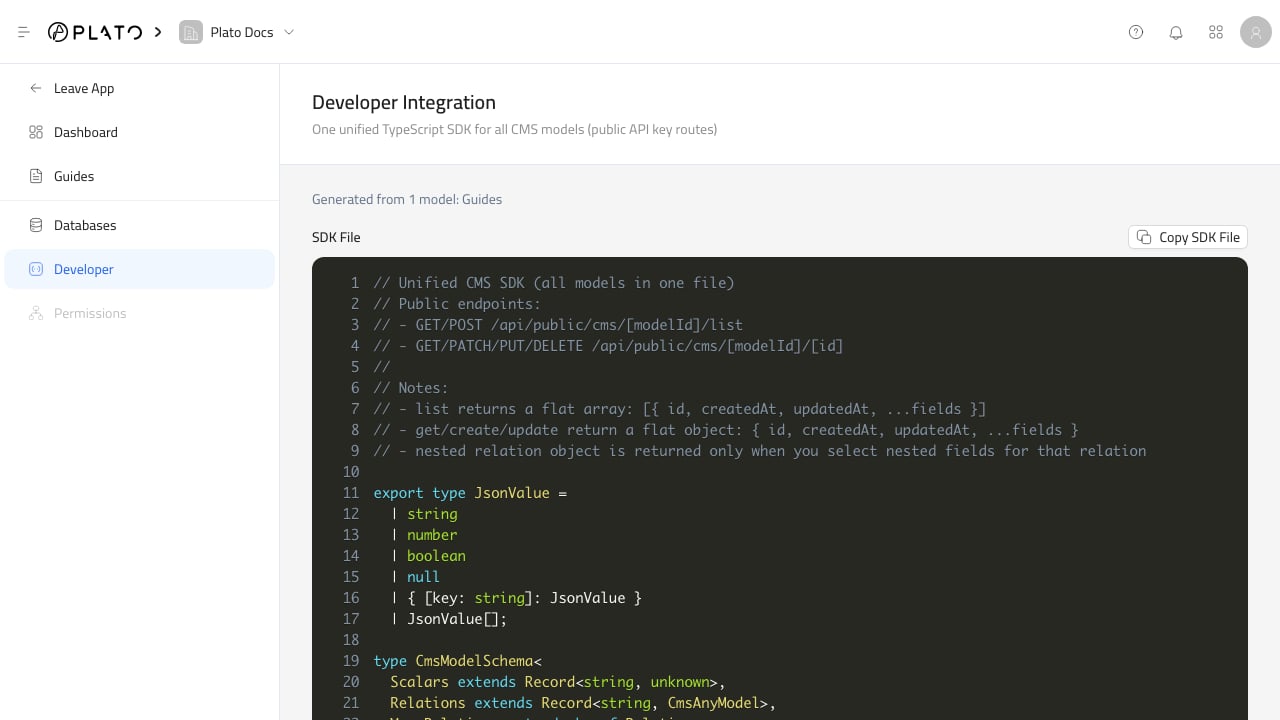
CMS developer tools Developer Tools generate code from the current CMS databases and fields. Use this page when a website, integration, or external service needs to read or write CMS entries through the public API.

What Developer Tools Include

The generated output can include:
  • Model identifiers based on database identifiers.
  • TypeScript model types.
  • Create and update input types.
  • A typed CMS client.
  • Public endpoint notes.
  • API examples for listing, reading, creating, updating, and deleting entries.

Before Generating Code

Review the database schemas first. Check that:
  • Database identifiers are stable.
  • Field keys are readable and unique.
  • Required fields are correct.
  • Relation fields point to the correct target.
  • Select and checkbox options use stable values.
Generated code is only as clear as the schema it reads.

Public Endpoints

Developer Tools reference the public CMS endpoints:
GET /api/public/cms/[modelId]/list
POST /api/public/cms/[modelId]/list
GET /api/public/cms/[modelId]/[id]
PATCH /api/public/cms/[modelId]/[id]
PUT /api/public/cms/[modelId]/[id]
DELETE /api/public/cms/[modelId]/[id]
Public requests use an API key. Create and manage API keys from API Keys.

Selection And Relations

The generated client supports selecting fields and nested relation fields. Use selection when a public page only needs part of an entry, or when relation depth should be controlled. Keep relation depth small for public pages so responses stay fast and predictable.