> ## Documentation Index
> Fetch the complete documentation index at: https://docs.plato.ae/llms.txt
> Use this file to discover all available pages before exploring further.
# Ordering
> Configure retail checkout options, customer fields, payments, and operating hours.
Ordering settings decide how customers can place orders from the public retail catalog.
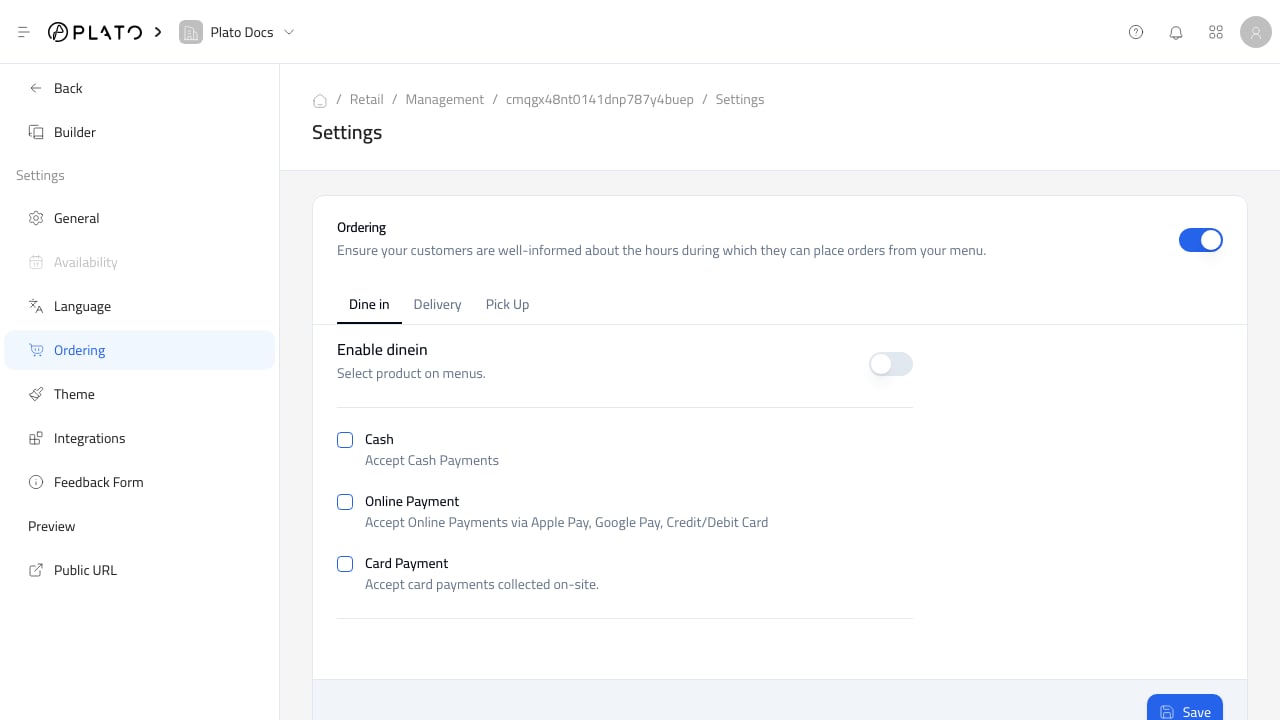 ## Checkout Options
Only enable order types and payment methods the store can actually support.
If delivery or pickup is not staffed, keep it disabled until the team is ready.
## Customer Fields
Use customer fields to ask for information staff need to prepare, hand off, or deliver an order.
Keep customer fields short. Ask only for information the team actually uses.
## Operating Hours
Operating hours control when customers can place orders.
Review every order type separately. Delivery and pickup often need different hours from counter service.
## Checkout Options
Only enable order types and payment methods the store can actually support.
If delivery or pickup is not staffed, keep it disabled until the team is ready.
## Customer Fields
Use customer fields to ask for information staff need to prepare, hand off, or deliver an order.
Keep customer fields short. Ask only for information the team actually uses.
## Operating Hours
Operating hours control when customers can place orders.
Review every order type separately. Delivery and pickup often need different hours from counter service.