> ## Documentation Index
> Fetch the complete documentation index at: https://docs.plato.ae/llms.txt
> Use this file to discover all available pages before exploring further.
# Add or Edit an Item
> Create inventory items and set units, conversion factors, costs, and minimum stock.
Create an item for anything your team wants to track in stock.
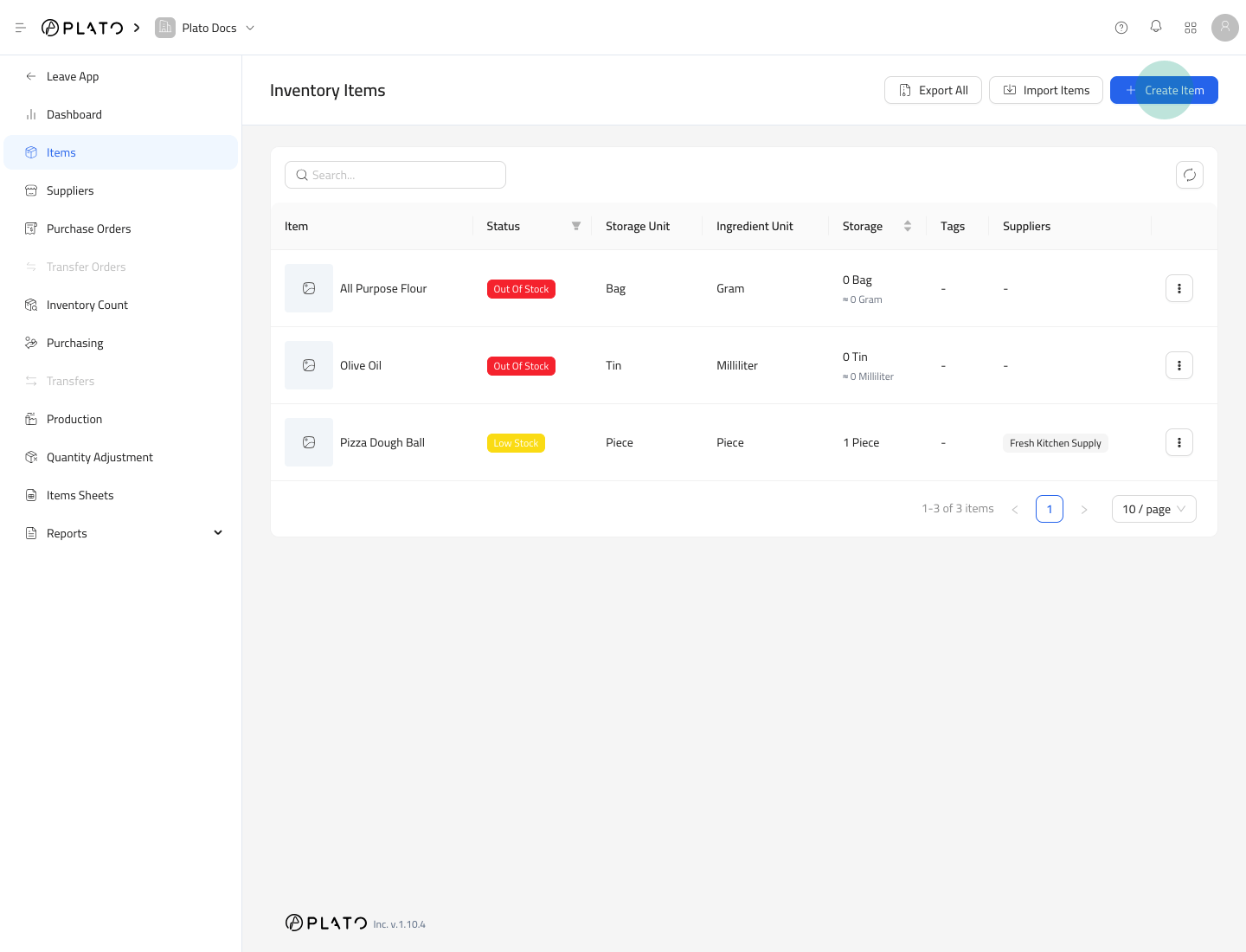 ## Create an Item
1. Open `Inventory`.
2. Go to `Items`.
3. Click `Create Item`.
4. Fill the item setup form.
5. Click `Save`.
## Create an Item
1. Open `Inventory`.
2. Go to `Items`.
3. Click `Create Item`.
4. Fill the item setup form.
5. Click `Save`.
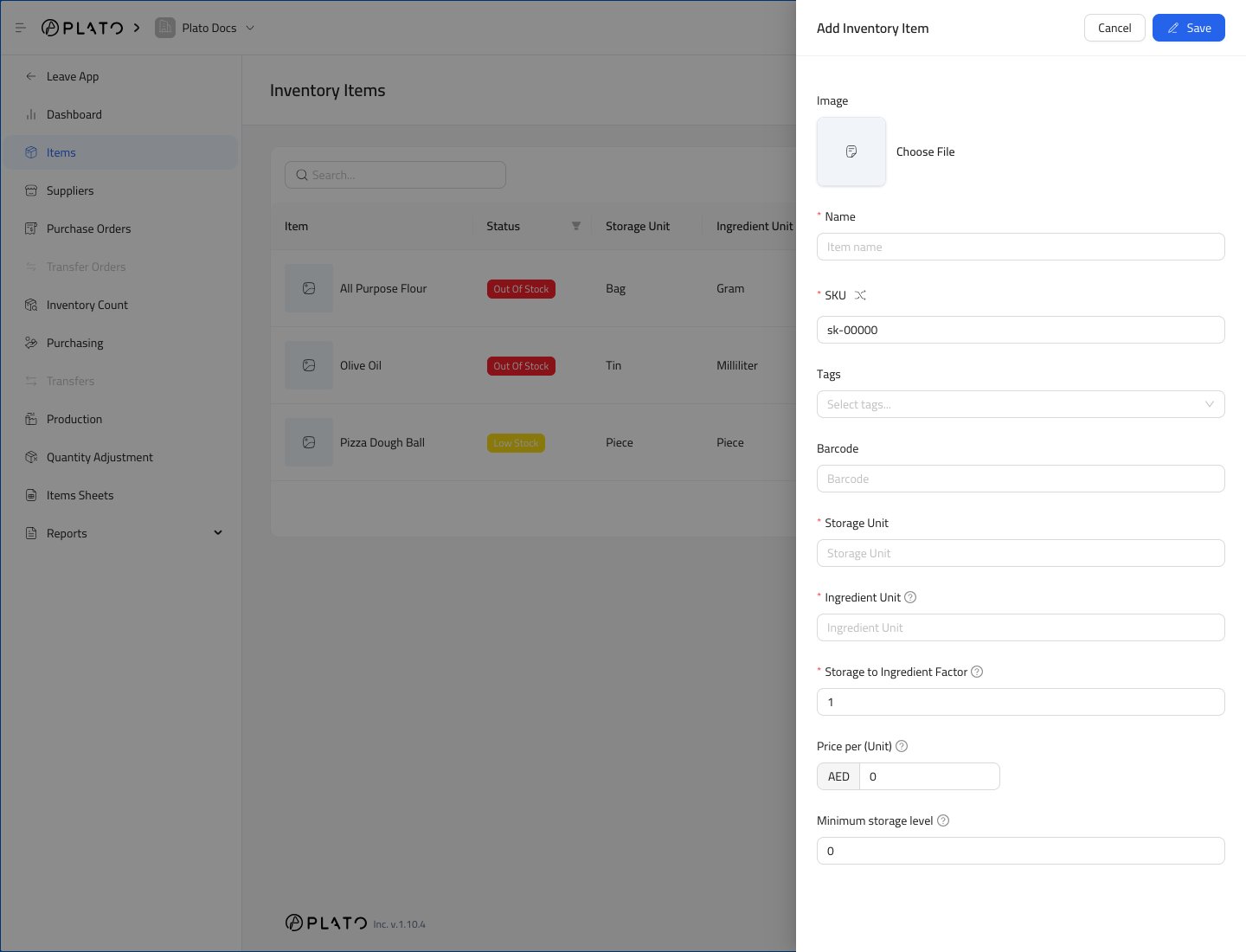 ## Item Fields
Use a clear item name that staff will recognize on counts, purchasing, and reports.
The main fields are:
* `Name` is the display name.
* `SKU` is the item code used in lists and reports.
* `Barcode` is optional, but useful if your team scans items.
* `Storage Unit` is how the item is stored, such as bag, tin, bottle, case, or piece.
* `Ingredient Unit` is how the item is used in recipes or consumption, such as gram, milliliter, or piece.
* `Storage to Ingredient Factor` tells Plato how many ingredient units are inside one storage unit.
* `Price` stores the item cost.
* `Minimum storage level` controls low-stock alerts.
## Example Unit Setup
If flour is stored by bag but used by gram:
1. Set `Storage Unit` to `Bag`.
2. Set `Ingredient Unit` to `Gram`.
3. Set `Storage to Ingredient Factor` to the number of grams in one bag.
This lets Plato show both storage quantity and ingredient quantity.
## Edit an Item
1. Open `Items`.
2. Open the row action menu for the item.
3. Select `Edit Item`.
4. Update the item details.
5. Save the changes.
Be careful when changing units after the item has already been used in purchasing, counts, production, or formulas.
## Item Fields
Use a clear item name that staff will recognize on counts, purchasing, and reports.
The main fields are:
* `Name` is the display name.
* `SKU` is the item code used in lists and reports.
* `Barcode` is optional, but useful if your team scans items.
* `Storage Unit` is how the item is stored, such as bag, tin, bottle, case, or piece.
* `Ingredient Unit` is how the item is used in recipes or consumption, such as gram, milliliter, or piece.
* `Storage to Ingredient Factor` tells Plato how many ingredient units are inside one storage unit.
* `Price` stores the item cost.
* `Minimum storage level` controls low-stock alerts.
## Example Unit Setup
If flour is stored by bag but used by gram:
1. Set `Storage Unit` to `Bag`.
2. Set `Ingredient Unit` to `Gram`.
3. Set `Storage to Ingredient Factor` to the number of grams in one bag.
This lets Plato show both storage quantity and ingredient quantity.
## Edit an Item
1. Open `Items`.
2. Open the row action menu for the item.
3. Select `Edit Item`.
4. Update the item details.
5. Save the changes.
Be careful when changing units after the item has already been used in purchasing, counts, production, or formulas.