> ## Documentation Index
> Fetch the complete documentation index at: https://docs.plato.ae/llms.txt
> Use this file to discover all available pages before exploring further.
# Domains
> Add custom domains to Plato apps and complete DNS verification.
Use Domains when you want a custom web address to open one of your Plato apps.
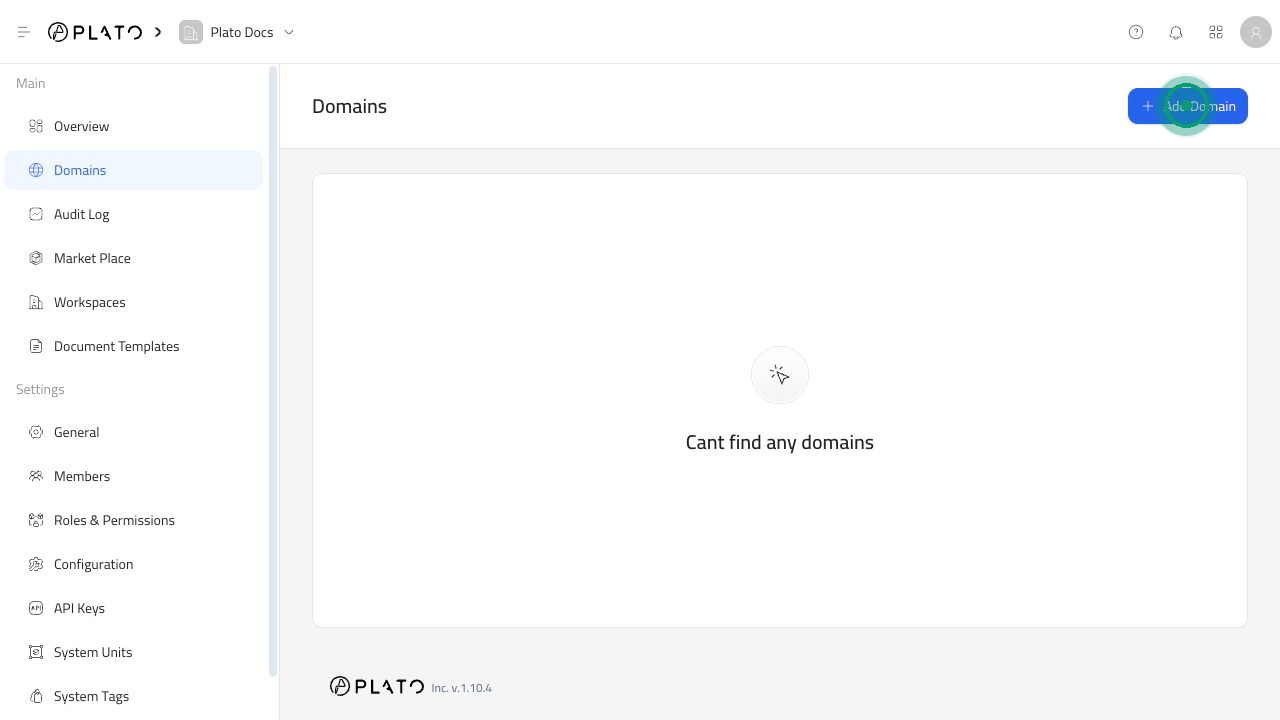 ## Add A Domain
1. Open `Domains`.
2. Click `Add Domain`.
3. Enter the domain or subdomain, such as `go.acme.com`.
4. Select the Plato app the domain should open.
5. Click `Save`.
## Add A Domain
1. Open `Domains`.
2. Click `Add Domain`.
3. Enter the domain or subdomain, such as `go.acme.com`.
4. Select the Plato app the domain should open.
5. Click `Save`.
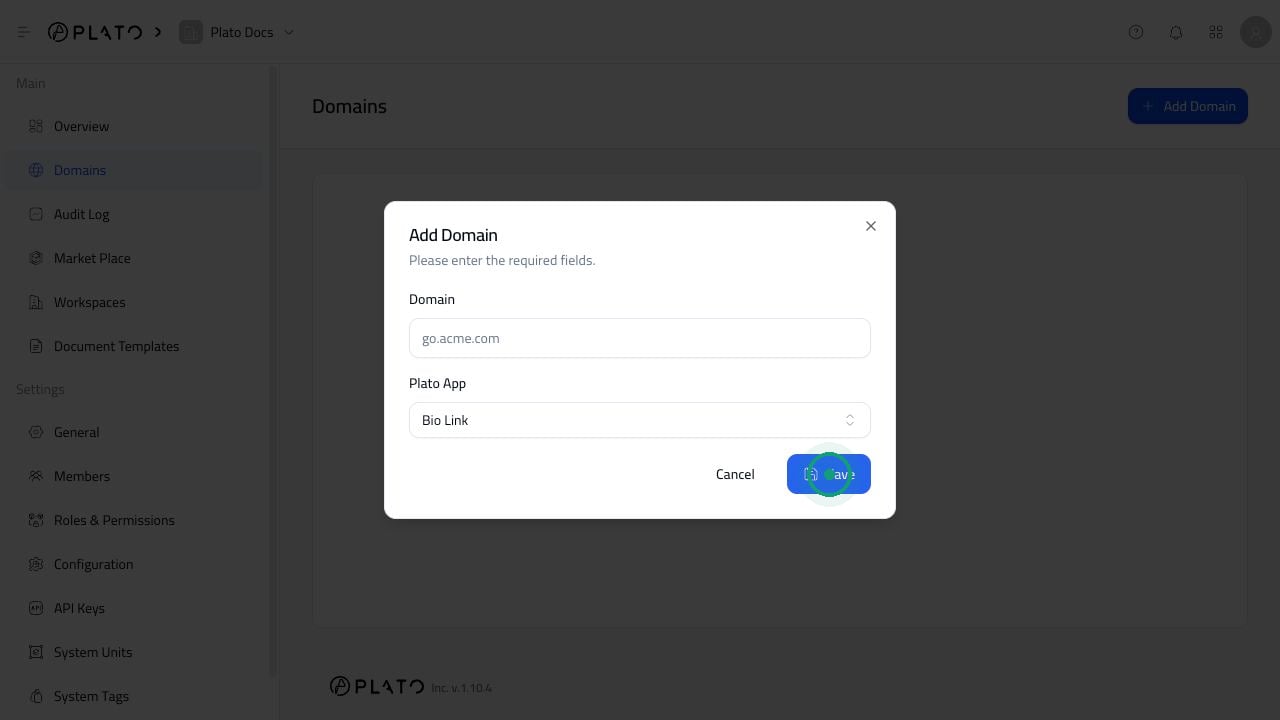 For example, you can connect a domain to Bio Link so visitors open your Bio Link page from your own branded URL.
## Complete DNS Setup
After adding a domain, open its details and follow the DNS instructions shown in the Console.
You may need to add a record at your DNS provider. The Console will show the exact record type, name, and value to copy.
Common examples include:
* A verification record to prove you own the domain.
* A record for a root domain such as `example.com`.
* A record for a subdomain such as `go.example.com`.
Always copy the values from your own Console screen. DNS values can change depending on the domain.
## Wait For The Domain To Become Active
DNS changes can take time. If everything looks correct but the domain is still pending, wait and refresh verification later. It can take up to 12 hours for changes to update everywhere.
If the Console says there are conflicting DNS records, remove the conflicting records from your DNS provider, then refresh verification.
## Delete A Domain
1. Open `Domains`.
2. Open the three-dot menu beside the domain.
3. Click `Delete`.
4. Confirm the deletion.
Deleting the domain removes it from Plato. You may also need to clean up DNS records at your DNS provider.
For example, you can connect a domain to Bio Link so visitors open your Bio Link page from your own branded URL.
## Complete DNS Setup
After adding a domain, open its details and follow the DNS instructions shown in the Console.
You may need to add a record at your DNS provider. The Console will show the exact record type, name, and value to copy.
Common examples include:
* A verification record to prove you own the domain.
* A record for a root domain such as `example.com`.
* A record for a subdomain such as `go.example.com`.
Always copy the values from your own Console screen. DNS values can change depending on the domain.
## Wait For The Domain To Become Active
DNS changes can take time. If everything looks correct but the domain is still pending, wait and refresh verification later. It can take up to 12 hours for changes to update everywhere.
If the Console says there are conflicting DNS records, remove the conflicting records from your DNS provider, then refresh verification.
## Delete A Domain
1. Open `Domains`.
2. Open the three-dot menu beside the domain.
3. Click `Delete`.
4. Confirm the deletion.
Deleting the domain removes it from Plato. You may also need to clean up DNS records at your DNS provider.