> ## Documentation Index
> Fetch the complete documentation index at: https://docs.plato.ae/llms.txt
> Use this file to discover all available pages before exploring further.
# Console
> Manage your Plato workspace, team, apps, settings, domains, and connected tools.
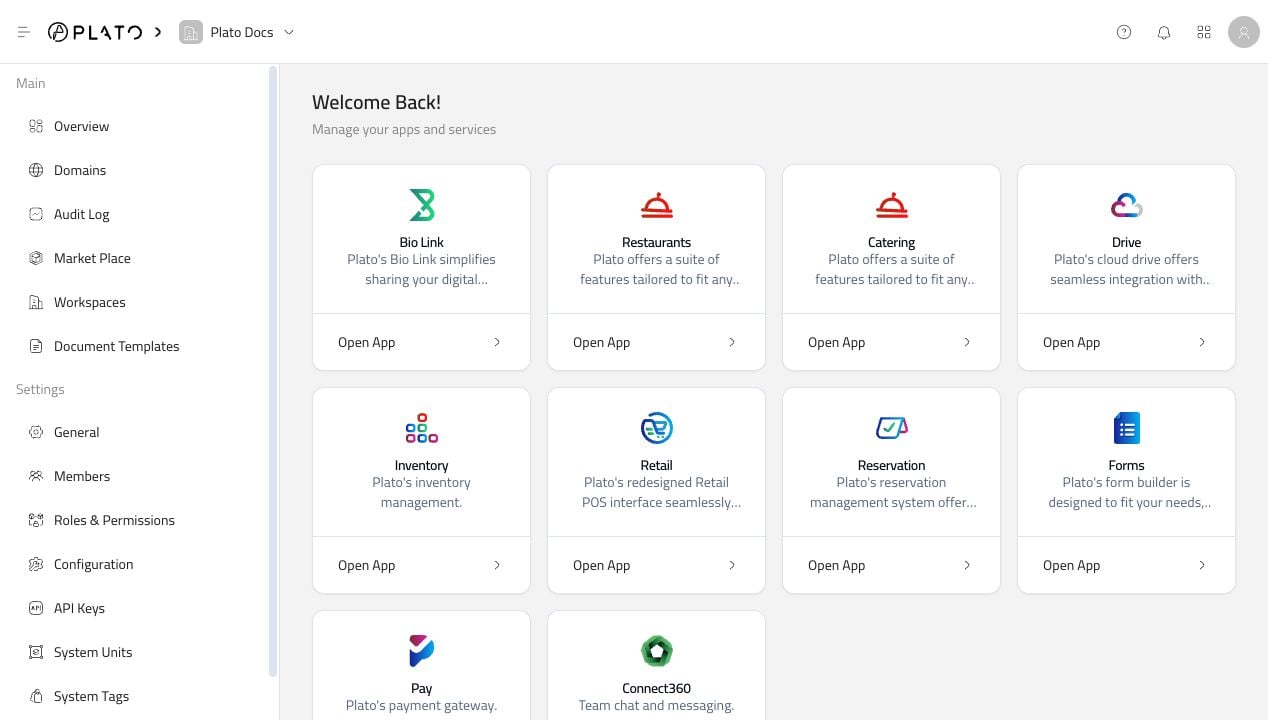
The Plato Console is the control room for your workspace. It is where you open Plato apps, invite your team, decide who can access what, update workspace settings, connect domains, and keep an eye on recent activity.
Start in Console when the change affects the workspace as a whole. Once you open an app, the sidebar changes to that app's own tools and workflows.
 ## Start With The Main Things
Most Console work falls into one of these paths:
Jump from the Console dashboard into Restaurant, Bio Link, Connect360, CMS, Drive, or another active app.
Add members, review access, set staff PINs, and keep invitations under control.
Create roles and decide which pages, actions, and apps each team can use.
Review address, language, currency, tax, order defaults, and workspace details.
Add branded domains for customer-facing pages and public experiences.
Give trusted integrations access with the right role and permissions.
Use the Console docs when the change affects the workspace. Use the app docs when the work happens inside a product, like Bio Link buttons or Restaurant menus.
## Fast Paths
Need to open Bio Link, Restaurant, or another app? Start with [Apps](/console/open-an-app).
Need to review existing access? Start with [Members](/console/members).
Need to set a teammate PIN? Start with [Member PINs](/console/member-pins).
Need to decide what a teammate can access? Start with [Roles](/console/roles-and-permissions).
Need to update business details, VAT, language, or order defaults? Start with [Configuration](/console/configuration).
Need history, notifications, account settings, units, tags, or troubleshooting? Each has its own page in the Console sidebar.
## Start With The Main Things
Most Console work falls into one of these paths:
Jump from the Console dashboard into Restaurant, Bio Link, Connect360, CMS, Drive, or another active app.
Add members, review access, set staff PINs, and keep invitations under control.
Create roles and decide which pages, actions, and apps each team can use.
Review address, language, currency, tax, order defaults, and workspace details.
Add branded domains for customer-facing pages and public experiences.
Give trusted integrations access with the right role and permissions.
Use the Console docs when the change affects the workspace. Use the app docs when the work happens inside a product, like Bio Link buttons or Restaurant menus.
## Fast Paths
Need to open Bio Link, Restaurant, or another app? Start with [Apps](/console/open-an-app).
Need to review existing access? Start with [Members](/console/members).
Need to set a teammate PIN? Start with [Member PINs](/console/member-pins).
Need to decide what a teammate can access? Start with [Roles](/console/roles-and-permissions).
Need to update business details, VAT, language, or order defaults? Start with [Configuration](/console/configuration).
Need history, notifications, account settings, units, tags, or troubleshooting? Each has its own page in the Console sidebar.